How to call a shell script from python code?
This is how to How to call a shell script from python code
To call a shell script from Python code, you can use thesubprocess module, which is a part of the Python standard library. The subprocess module allows you to spawn new processes, connect to their input/output/error pipes, and obtain their return codes.
import subprocess
# Call the script using the `call` function
subprocess.call(["/path/to/script.sh"])
# Call the script and pass arguments to it
subprocess.call(["/path/to/script.sh", "arg1", "arg2"])
# Call the script and store the output in a variable
output = subprocess.check_output(["/path/to/script.sh"])
print(output)
In this example, the call function is used to execute the shell script and wait for it to complete. The check_output function is used to execute the shell script and store the output in a variable.
You can also use the Popen class from the subprocess module to execute the shell script in a separate process and communicate with it in real-time.
import subprocess

subprocess.call(['sh shell_script.sh arguments'])
or
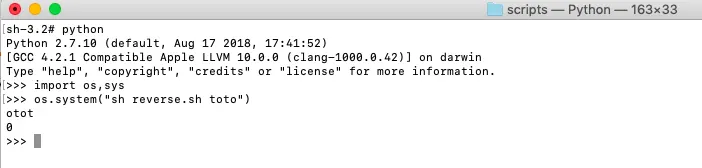
import sys, os
os.system("sh shell_script.sh arguments")
Output Example