reverse a string on Linux and Windows
How to reverse a string on Linux and Windows
On Linux:
- Using the
revcommand: Therevcommand is a utility that reverses the lines of a file or the characters in a string. To reverse a string, you can use theechocommand to pass the string torev:
echo "string" | rev
- Using the
sedcommand: Thesedcommand is a powerful utility that can perform various text transformations. To reverse a string, you can use thesedcommand with the-roption and the's/.*(.)/\1/g'expression:
echo "string" | sed -r 's/.*(.)/\1/g'
- Using the
awkcommand: Theawkcommand is a programming language that is used for text processing. To reverse a string, you can use theawkcommand with the{print}action:
echo "string" | awk '{print $1}'
On Windows:
- Using the
powershellcommand: Thepowershellcommand is a shell that provides a command-line interface for Windows. To reverse a string, you can use thepowershellcommand with the-Coption and the'[System.Text.Encoding]::Unicode.GetString([System.Text.Encoding]::Unicode.GetBytes("string"))'expression:
powershell -C "[System.Text.Encoding]::Unicode.GetString([System.Text.Encoding]::Unicode.GetBytes("string"))"
- Using the
cmdcommand: Thecmdcommand is the command-line interpreter for Windows. To reverse a string, you can use thecmdcommand with theforloop:
cmd /c "for /L %i in (1,1,%len%) do @echo !string:~%len%-%i,1!"
These are some ways to reverse a string on Linux and Windows. There are other ways to achieve this, using different utilities or programming languages.
Via shell script on Linux
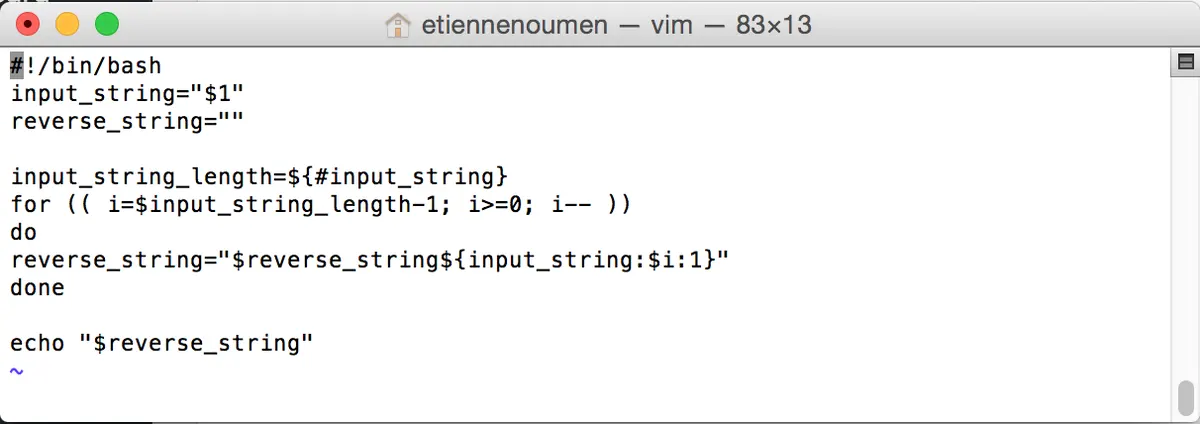
sh-3.2# vi reverse.sh
#### Start Script #####
#!/bin/bash
input_string="$1"
reverse_string=""
input_string_length=${#input_string}
for (( i=$input_string_length-1; i>=0; i-- ))
do
reverse_string="$reverse_string${input_string:$i:1}"
done
echo "$reverse_string"
##### End Script #####
Let's run it:
sh-3.2# chmod 775 reverse.sh
sh-3.2# ./reverse.sh Etienne
enneitE
Via powershell script on Windows
#Let's use the script reverse.ps1 below.
######
$string="Etienne"
$string_array=$string -split ""
[array]::Reverse($string_array)
$string_array -join ''
#####Output#####
PS C:\Users\etienne_noumen\Documents\Etienne\Scripting> .\reverse.ps1
E t i e n n e
enneitE
Via powershell script on Windows in one line
([regex]::Matches($String,'.','RightToLeft') | ForEach {$_.value}) -join ''
Via batch script on Windows
::Note: ReverseStr also calls StrLen
::and string length is not greater than 80 chars
:: but can be changed.
@echo off
SetLocal EnableDelayedExpansion
cls
set Str=Etienne
call :StrLen %Str%
echo Length=%Len%
call :ReverseStr %Str%
echo String=%Str%
echo Reverse Str=%Reverse%
exit /b
::----------------
:: Calc Var Length
::----------------
:: %*=Str to Check
:: Returns %Len%
:: ---------------
:StrLen %*
set Data=%*
for /L %%a in (0,1,80) do (
set Char=!Data:~%%a,1!
if not "!Char!"=="" (
set /a Len=%%a+1
) else (exit /b)
)
exit /b
::---------------
:: Reverse String
::---------------
:: %* Str to Reverse
:: Returns %Reverse%
::------------------
:ReverseStr %*
set Data=%*
call :StrLen %Data%
for /L %%a in (!Len!,-1,0) do (
set Char=!Data:~%%a,1!
set Reverse=!Reverse!!Char!
)
exit /b
Via perl script on Windows or Linux
Via python script on Windows or Linux
def reverse_string(a_string)
return a_string[::-1]
reverse_string("etienne") returns "enneite"
Source: