Count all http response status codes in a web application log files on linux
Count all http response status codes in a web application log files on linux
Here is one way to count all the HTTP response status codes in a web application log file on Linux:
- Open the log file using the
catcommand:
cat log_file
- Use the
grepcommand to search for lines that contain an HTTP status code:
cat log_file | grep -Eo 'HTTP/[0-9\.]+ [0-9]+'
This will output all the lines in the log file that contain an HTTP status code.
- Use the
awkcommand to extract the status code from each line:
cat log_file | grep -Eo 'HTTP/[0-9\.]+ [0-9]+' | awk '{print $2}'
This will output a list of all the status codes in the log file.
- Use the
sortanduniqcommands to count the number of occurrences of each status code:
cat log_file | grep -Eo 'HTTP/[0-9\.]+ [0-9]+' | awk '{print $2}' | sort | uniq -c1- Sample Log file:
Given the log file below, we want to know all http response status code and sort them from the highest amount of response code to the lowest.
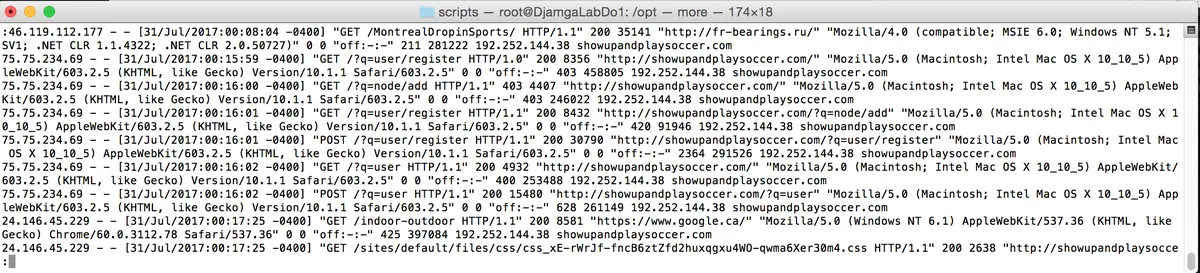
2- Use this command below to Count all http response status codes in a web application log files on linux:
awk '{print $9}' sample_log.log | sort | uniq -c | sort -rn
3- Output