DjamgaMind: Audio Intelligence for the C-Suite (Daily AI News, Energy, Healthcare, Finance)
Full-Stack AI Intelligence. Zero Noise.The definitive audio briefing for the C-Suite and AI Architects. From Daily News and Strategic Deep Dives to high-density Industrial & Regulatory Intelligence—decoded at the speed of the AI era. . 👉 Start your specialized audio briefing today at Djamgamind.com
AI Jobs and Career
I wanted to share an exciting opportunity for those of you looking to advance your careers in the AI space. You know how rapidly the landscape is evolving, and finding the right fit can be a challenge. That's why I'm excited about Mercor – they're a platform specifically designed to connect top-tier AI talent with leading companies. Whether you're a data scientist, machine learning engineer, or something else entirely, Mercor can help you find your next big role. If you're ready to take the next step in your AI career, check them out through my referral link: https://work.mercor.com/?referralCode=82d5f4e3-e1a3-4064-963f-c197bb2c8db1. It's a fantastic resource, and I encourage you to explore the opportunities they have available.
- Full Stack Engineer [$150K-$220K]
- Software Engineer, Tooling & AI Workflow, Contract [$90/hour]
- DevOps Engineer, India, Contract [$90/hour]
- More AI Jobs Opportunitieshere
| Job Title | Status | Pay |
|---|---|---|
| Full-Stack Engineer | Strong match, Full-time | $150K - $220K / year |
| Developer Experience and Productivity Engineer | Pre-qualified, Full-time | $160K - $300K / year |
| Software Engineer - Tooling & AI Workflows (Contract) | Contract | $90 / hour |
| DevOps Engineer (India) | Full-time | $20K - $50K / year |
| Senior Full-Stack Engineer | Full-time | $2.8K - $4K / week |
| Enterprise IT & Cloud Domain Expert - India | Contract | $20 - $30 / hour |
| Senior Software Engineer | Contract | $100 - $200 / hour |
| Senior Software Engineer | Pre-qualified, Full-time | $150K - $300K / year |
| Senior Full-Stack Engineer: Latin America | Full-time | $1.6K - $2.1K / week |
| Software Engineering Expert | Contract | $50 - $150 / hour |
| Generalist Video Annotators | Contract | $45 / hour |
| Generalist Writing Expert | Contract | $45 / hour |
| Editors, Fact Checkers, & Data Quality Reviewers | Contract | $50 - $60 / hour |
| Multilingual Expert | Contract | $54 / hour |
| Mathematics Expert (PhD) | Contract | $60 - $80 / hour |
| Software Engineer - India | Contract | $20 - $45 / hour |
| Physics Expert (PhD) | Contract | $60 - $80 / hour |
| Finance Expert | Contract | $150 / hour |
| Designers | Contract | $50 - $70 / hour |
| Chemistry Expert (PhD) | Contract | $60 - $80 / hour |
How Microsoft’s Cortana Stacks Up Against Siri and Alexa in Terms of Intelligence?
It seems like everyone these days has a voice assistant. Whether you’re using Apple’s Siri, Amazon’s Alexa, or Microsoft’s Cortana, these handy little programs are always there to help you with the weather forecast, setting timers, and playing your favorite tunes. But how do they stack up against each other in terms of intelligence? Let’s take a closer look.
Apple’s Siri was the first voice assistant on the scene, debuting on the iPhone 4S in 2011. Siri is powered by artificial intelligence (AI) and natural language processing (NLP) algorithms that allow it to understand and respond to questions and commands in human speech. Siri can perform a variety of tasks, from setting alarms to sending text messages, and is constantly learning new skills as Apple adds updates. However, Siri does have its limitations; for example, it cannot currently perform tasks that require more than one step (such as adding an item to a grocery list and then setting a reminder for when to buy it).
Amazon’s Alexa followed close on Siri’s heels, debuting on the Amazon Echo in 2014. Like Siri, Alexa is powered by AI and NLP algorithms that enable her to understand and respond to questions and commands. Alexa also boasts an ever-growing skill set, thanks to constant updates from Amazon. One area where Alexa excels is in her ability to handle multi-step tasks; for example, she can easily add an item to a grocery list, set a reminder for when to buy it, and even place an order for it online—all with just a few simple commands.
Microsoft’s Cortana debuted in 2014 as well, but unlike Siri and Alexa, she was not originally designed as a digital assistant for home use. Instead, Cortana was developed as a productivity tool for Microsoft Windows users. However, Cortana did eventually make her way into the home via the Harman Kardon Invoke speaker in 2017. Cortana is powered by the same AI and NLP algorithms as her competitors; however, she has one key advantage over them—her deep integration with Microsoft products such as Office 365 and Outlook. This gives her access to a wealth of information that allows her to be more helpful than other voice assistants when it comes to things like scheduling appointments and managing email.
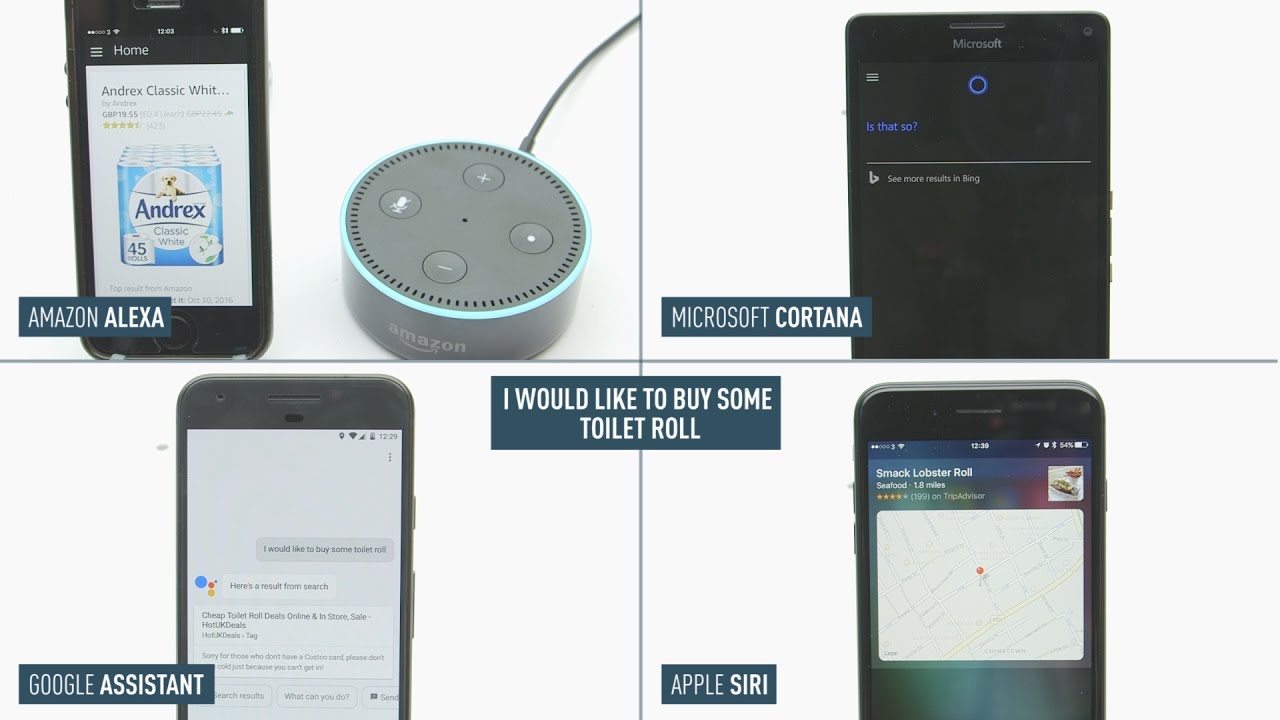
Cortana: Pros – Cortana is able to understand natural language patterns and contextual cues well, making her one of the more accurate voice assistants available. Additionally, Cortana has a wide range of integrations with other Microsoft products, making her a good choice for users who are already invested in the Microsoft ecosystem.
Cortana Cons – One of Cortana’s primary drawbacks is that she is only available on Windows devices. This limits her appeal to users who don’t own a Windows phone or PC. Additionally, Cortana doesn’t have as many skills as some of her competitors; while she can do basic tasks like setting timers and sending texts, she doesn’t have the same breadth of knowledge as Siri or Alexa.
Siri: Pros – Siri is available on all Apple devices, giving her a wider reach than some of her competitors. Additionally, Siri has a large number of skills; she can do everything from ordering an Uber to sending a message through WhatsApp. And thanks to Siri’s integration with Apple products like the iPhone and Apple Watch, she is able to offer a seamless user experience.
Siri Cons – While Siri is generally accurate when it comes to understanding voice commands, she isn’t always perfect. Additionally, Siri doesn’t always provide the most accurate results when users ask her questions; often, she will provide a web search result instead of an answer directly from Apple’s Knowledge Graph.
AI-Powered Professional Certification Quiz Platform
Web|iOs|Android|Windows
Are you passionate about AI and looking for your next career challenge? In the fast-evolving world of artificial intelligence, connecting with the right opportunities can make all the difference. We're excited to recommend Mercor, a premier platform dedicated to bridging the gap between exceptional AI professionals and innovative companies.
Whether you're seeking roles in machine learning, data science, or other cutting-edge AI fields, Mercor offers a streamlined path to your ideal position. Explore the possibilities and accelerate your AI career by visiting Mercor through our exclusive referral link:
Find Your AI Dream Job on Mercor
Your next big opportunity in AI could be just a click away!
Alexa: Pros – Alexa has more skills than any other AI assistant currently on the market; there are over 100000 skills available for users to choose from. Additionally, Alexa is constantly learning and adding new skills; since she is powered by artificial intelligence, her capabilities are constantly expanding. Finally, Alexa is available on a wide range of devices beyond just Amazon Echo speakers; she can be found in everything from cars to microwaves.
AI- Powered Jobs Interview Warmup For Job Seekers

⚽️Comparative Analysis: Top Calgary Amateur Soccer Clubs – Outdoor 2025 Season (Kids' Programs by Age Group)
Alexa Cons – One potential drawback of Alexa is that she is always listening; this could be seen as a privacy concern by some users. Additionally, because Alexa is powered by artificial intelligence, she sometimes makes mistakes when understanding voice commands or providing results to questions.
Apple’s Siri was the first voice assistant on the scene, debuting on the iPhone 4S in 2011. Siri is powered by artificial intelligence (AI) and natural language processing (NLP) algorithms that allow it to understand and respond to questions and commands in human speech. Siri can perform a variety of tasks, from setting alarms to sending text messages, and is constantly learning new skills as Apple adds updates. However, Siri does have its limitations; for example, it cannot currently perform tasks that require more than one step (such as adding an item to a grocery list and then setting a reminder for when to buy it).
Amazon’s Alexa followed close on Siri’s heels, debuting on the Amazon Echo in 2014. Like Siri, Alexa is powered by AI and NLP algorithms that enable her to understand and respond to questions and commands. Alexa also boasts an ever-growing skill set, thanks to constant updates from Amazon. One area where Alexa excels is in her ability to handle multi-step tasks; for example, she can easily add an item to a grocery list, set a reminder for when to buy it, and even place an order for it online—all with just a few simple commands.
Microsoft’s Cortana debuted in 2014 as well, but unlike Siri and Alexa, she was not originally designed as a digital assistant for home use. Instead, Cortana was developed as a productivity tool for Microsoft Windows users. However, Cortana did eventually make her way into the home via the Harman Kardon Invoke speaker in 2017. Cortana is powered by the same AI and NLP algorithms as her competitors; however, she has one key advantage over them—her deep integration with Microsoft products such as Office 365 and Outlook. This gives her access to a wealth of information that allows her to be more helpful than other voice assistants when it comes to things like scheduling appointments and managing email.
When it comes to raw intelligence, there’s no doubt that Cortana has the edge. While Siri and Alexa are both capable of answering basic questions, Cortana is able to draw on the wealth of knowledge contained within Microsoft’s Bing search engine to provide more comprehensive answers. For example, try asking Siri or Alexa who won the Super Bowl in 2002. Both will likely give you the correct answer of “The New England Patriots.” But ask Cortana the same question, and she’ll not only tell you that the Patriots won, but she’ll also provide a link to the Bing search results for “2002 Super Bowl.”
Cortana is also able to understand follow-up questions and provide relevant information accordingly. For instance, if you ask Cortana how tall Mount Everest is and then follow up with a question about how that compares to the height of Mount Kilimanjaro, she’ll understand that you’re looking for a comparison of the two mountains and provide an answer accordingly. Neither Siri nor Alexa is able to do this.
Finally, Cortana is better at understanding natural language than either Siri or Alexa. This means that she can more easily understand questions that are phrased in a way that sounds like normal human speech. For example, try asking Siri or Alexa to “show me pictures of cats wearing party hats.” Both will likely have trouble understanding this request since it doesn’t use standard grammar. But ask Cortana the same question, and she’ll know exactly what you want and pull up a Bing search results page full of images matching your request.
Conclusion:
So there you have it! All three AI assistants have their pros and cons; it really just comes down to personal preference as to which one you choose. If you’re looking for an assistant that is widely available and has a large number of skills, Siri or Alexa might be the right choice for you. However, if you’re looking for an assistant with deep integrations into Microsoft products, Cortana might be a better option. No matter which assistant you choose, you’re sure to enjoy the convenience and efficiency they provide!
Which voice assistant is the most intelligent? That depends on what you’re looking for. If you’re looking for someone who can handle complex tasks such as online shopping or managing your calendar, then Alexa is probably your best bet. If you’re looking for someone who can help you be more productive at work or school, then Cortana is probably your best choice. And if you’re just looking for someone who can answer basic questions and perform simple tasks, then Siri will probably suffice. Ultimately, it all comes down to personal preference—so try them all out and see which one you like best!
What is Problem Formulation in Machine Learning and Top 4 examples of Problem Formulation in Machine Learning?
How to activate Siri on iPhone 13 and 14
Do one of the following: On an iPhone with Face ID: Press and hold the side button. On an iPhone with a Home button: Press and hold the Home button. EarPods: Press and hold the center or call button.
AI Jobs and Career
And before we wrap up today's AI news, I wanted to share an exciting opportunity for those of you looking to advance your careers in the AI space. You know how rapidly the landscape is evolving, and finding the right fit can be a challenge. That's why I'm excited about Mercor – they're a platform specifically designed to connect top-tier AI talent with leading companies. Whether you're a data scientist, machine learning engineer, or something else entirely, Mercor can help you find your next big role. If you're ready to take the next step in your AI career, check them out through my referral link: https://work.mercor.com/?referralCode=82d5f4e3-e1a3-4064-963f-c197bb2c8db1. It's a fantastic resource, and I encourage you to explore the opportunities they have available.
How To Eject Water From Your iPhone Using Siri (2022)?
Cortana halo show

How do we know that the Top 3 Voice Recognition Devices like Siri Alexa and Ok Google are not spying on us?
- Siri AI: A Deep Dive into Every Feature of Apple’s Most Powerful Assistant Yetby IAKH Studio (Siri on Medium) on June 10, 2026 at 1:50 pm
Apple just reinvented its voice assistant from the ground up. On June 7, 2026, at WWDC, Apple officially unveiled Siri AI — a completely…Continue reading on Medium »
- WWDC26 — The Announcementsby Dr J Rogel-Salazar (Siri on Medium) on June 10, 2026 at 11:13 am
That’s the part worth slowing down for. Not because the rest of the keynote was bad, au contraire, but because it is worth spending some…Continue reading on Medium »
- Device unresponsiveby /u/evila_elf (Amazon Alexa) on June 10, 2026 at 10:06 am
Ever since I had to reset my WiFi password, whenever my WiFi takes a little dip, one or more of my devices go offline and I can only get them working again by going through the set up routine. Half the time I can’t get the orange light to show up to start set up. Unplug and replug and the blue light just keeps spinning. I hate these things so much! And I am annoyed that I have to rely on them as a alarm clock. submitted by /u/evila_elf [link] [comments]
- Device unresponsiveby /u/evila_elf (Amazon Alexa) on June 10, 2026 at 10:06 am
Ever since I had to reset my WiFi password, whenever my WiFi takes a little dip, one or more of my devices go offline and I can only get them working again by going through the set up routine. Half the time I can’t get the orange light to show up to start set up. Unplug and replug and the blue light just keeps spinning. I hate these things so much! And I am annoyed that I have to rely on them as a alarm clock. submitted by /u/evila_elf [link] [comments]
- Change Echo Plus photo screensaver frequency?by /u/nickymoo (Amazon Alexa) on June 10, 2026 at 10:00 am
Hi. I've recently got a new Echo Show 11 and I've got it as the photo display background. I can't find a away to adjust the length of time a photo is displayed for and this ( https://www.reddit.com/r/alexa/comments/zvy2zj/echo_show_photo_slideshow_frequency/ ) no longer works now Alexa Plus haunts the device. Do you know if this is still possible but in a different way, or is it just depreciated now Alexa Plus has invaded? submitted by /u/nickymoo [link] [comments]
- Change Echo Plus photo screensaver frequency?by /u/nickymoo (Amazon Alexa) on June 10, 2026 at 10:00 am
Hi. I've recently got a new Echo Show 11 and I've got it as the photo display background. I can't find a away to adjust the length of time a photo is displayed for and this ( https://www.reddit.com/r/alexa/comments/zvy2zj/echo_show_photo_slideshow_frequency/ ) no longer works now Alexa Plus haunts the device. Do you know if this is still possible but in a different way, or is it just depreciated now Alexa Plus has invaded? submitted by /u/nickymoo [link] [comments]
- Siri AI vs Galaxy AI: Which One Actually Deserves a Spot in Your Daily Life?by Tehnologijaviews (Siri on Medium) on June 10, 2026 at 6:21 am
Honest comparison of Siri and Galaxy AI based on daily use. Find out which AI assistant fits your lifestyle better in this detailed guide.Continue reading on Medium »
- I Keep Getting Weather for Hollandby /u/Dreamspitter (Amazon Alexa) on June 10, 2026 at 5:18 am
I went to Holland for a Tulip a full calendar month ago. ONLY for a day. YET now when I ask the weather sometimes Alexa will tell me the Weather for Holland instead of my home. Here's one thing I found. Alexa is likely stuck on the old location because of lingering notification settings, or a tied device address. To fix this, you will need to delete the outdated alert from your notifications and verify your primary Step One: Delete the Old Weather Alert Old weather alerts are tied to notification preferences and won't always update just by moving. * 1. Open the Alexa App and tap More in the bottom right corner. Go to Settings > Notifications. Select Weather. Look for the alerts tied to the place you only visited once, tap on them, and select Delete at the bottom of the screen. You can also say: "Alexa, cancel severe weather alerts," then later say: "Alexa, enable severe weather alerts" to prompt a reset. I've done these things, but I have no weather notifications for Holland Mi. At all. Step 2: Verify Your Device's Location Your Echo device retains a specific location that dictates your default weather. My default location of ALL my devices is at my home address. submitted by /u/Dreamspitter [link] [comments]
- I Keep Getting Weather for Hollandby /u/Dreamspitter (Amazon Alexa) on June 10, 2026 at 5:18 am
I went to Holland for a Tulip a full calendar month ago. ONLY for a day. YET now when I ask the weather sometimes Alexa will tell me the Weather for Holland instead of my home. Here's one thing I found. Alexa is likely stuck on the old location because of lingering notification settings, or a tied device address. To fix this, you will need to delete the outdated alert from your notifications and verify your primary Step One: Delete the Old Weather Alert Old weather alerts are tied to notification preferences and won't always update just by moving. * 1. Open the Alexa App and tap More in the bottom right corner. Go to Settings > Notifications. Select Weather. Look for the alerts tied to the place you only visited once, tap on them, and select Delete at the bottom of the screen. You can also say: "Alexa, cancel severe weather alerts," then later say: "Alexa, enable severe weather alerts" to prompt a reset. I've done these things, but I have no weather notifications for Holland Mi. At all. Step 2: Verify Your Device's Location Your Echo device retains a specific location that dictates your default weather. My default location of ALL my devices is at my home address. submitted by /u/Dreamspitter [link] [comments]
- Apple Finally Tried to Fix Siri. Cute. I’ll Believe It When My iPhone Stops Acting Confused.by Berker Ceylan (Siri on Medium) on June 10, 2026 at 4:10 am
WWDC 2026 was Apple’s big “Siri has entered therapy” moment. The promise is huge, but so is the emotional damage from 14 years of “I found…Continue reading on Activated Thinker »
- Alexa Won’t Skip Songs Anymoreby /u/MajorSea1650 (Amazon Alexa) on June 10, 2026 at 3:23 am
I’ve tried on Apple Music and Amazon Music. If I say next song or skip song it won’t skip it tells me you can control Bluetooth. On your device. I’ve always been able to skip songs through voice control before maybe two weeks ago. Does anyone know why this is happening? My echo dot is also only a few months old. submitted by /u/MajorSea1650 [link] [comments]
- Alexa Won’t Skip Songs Anymoreby /u/MajorSea1650 (Amazon Alexa) on June 10, 2026 at 3:23 am
I’ve tried on Apple Music and Amazon Music. If I say next song or skip song it won’t skip it tells me you can control Bluetooth. On your device. I’ve always been able to skip songs through voice control before maybe two weeks ago. Does anyone know why this is happening? My echo dot is also only a few months old. submitted by /u/MajorSea1650 [link] [comments]
- Apple’s Smart Home Isn’t Delayed Because Siri Isn’t Ready — It’s Delayed Because Siri Has Become…by Jalen Da-Rod Miles Evans (Siri on Medium) on June 10, 2026 at 1:12 am
When Intelligence Becomes The Organizing Principle Of A System, Hardware Stops Being Evaluated As A Product And Starts Being Judged As…Continue reading on Mac O’Clock »
- Can someone explain to me why this always happens??by /u/Dante2324 (Amazon Alexa) on June 10, 2026 at 12:24 am
I don’t have the Xbox skill enabled, I don’t have an Xbox connected to my echo dot, all I want is to unpause my TV 😭😭 submitted by /u/Dante2324 [link] [comments]
- Can someone explain to me why this always happens??by /u/Dante2324 (Amazon Alexa) on June 10, 2026 at 12:24 am
I don’t have the Xbox skill enabled, I don’t have an Xbox connected to my echo dot, all I want is to unpause my TV 😭😭 submitted by /u/Dante2324 [link] [comments]
- Siri AI Is Everything I Wanted And Moreby Andrew Zuo (Siri on Medium) on June 9, 2026 at 10:23 pm
WWDC has wrapped up and I’m quite impressed with what I saw. Which is a bit unusual because the entire event was barely over an hour long…Continue reading on Medium »
- My Media for Alexa - how do I play all music?by /u/scubaslimchicken (Amazon Alexa) on June 9, 2026 at 9:51 pm
Hi. I'm on the 7-day trial for My Media (looking for Plex alternative), but I can't figure how to play all music. It seems so simple, but everything I try ends up getting a response telling me it doesn't know what kind of music i want. Any help would be appreciated. submitted by /u/scubaslimchicken [link] [comments]
- My Media for Alexa - how do I play all music?by /u/scubaslimchicken (Amazon Alexa) on June 9, 2026 at 9:51 pm
Hi. I'm on the 7-day trial for My Media (looking for Plex alternative), but I can't figure how to play all music. It seems so simple, but everything I try ends up getting a response telling me it doesn't know what kind of music i want. Any help would be appreciated. submitted by /u/scubaslimchicken [link] [comments]
- Apple Used to Hide That Siri Will Run on Google. After WWDC, It’s Part of the Pitch.by Greg Dessau (Siri on Medium) on June 9, 2026 at 9:28 pm
The Google partnership was an awkward footnote in November. After this week’s WWDC keynote, Gemini-powered Siri is Apple’s attempt at…Continue reading on Human Offset »
- umm…is my Alexa being a bit racist?by /u/coysdaniel69 (Amazon Alexa) on June 9, 2026 at 9:13 pm
So we tried to put it into an Irish accent but saw it can only do American, English, Australian and Indian. We put it onto Indian and asked it how it was today. Alexa’s response was “I’m ok but people keep telling me I smell bad” We did it again and it replied “I’m feeling funky, in more than one sense of the word” Uh. Isn’t that a racist trope about Indian people? submitted by /u/coysdaniel69 [link] [comments]


96DRHDRA9J7GTN6